Write a native app the way you write a web page.
Rux is a pure-Rust UI language: familiar template / style / script sections and literal CSS, laid out by a real flexbox and grid engine and painted on the GPU. No browser. No webview. No JavaScript.
Early and experimental (0.x) · Apache-2.0 or MIT · desktop today, mobile next
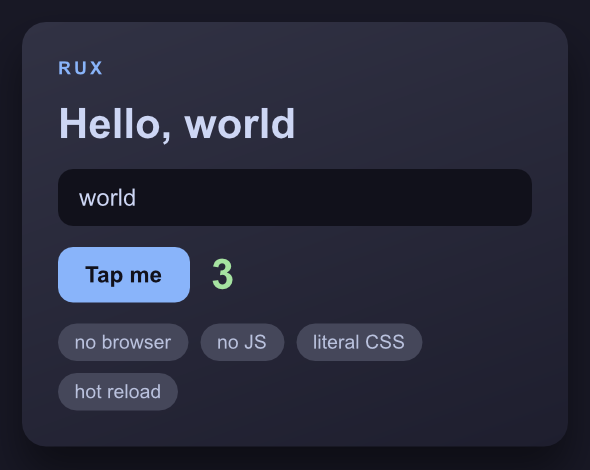
examples/showcase.rux, running in a native window
The whole app, in one file
That window is this file, all of it. No layout widgets, no JSX, no .slint DSL,
no JavaScript. <template> says what the content is, <style> is literal CSS
that says where it goes and how it looks, <script> holds the state.
<template>
  <screen class="app">
    <view class="card">
      <text class="eyebrow">RUX</text>
      <text class="title">Hello, {{ name }}</text>

      <input class="field" r-model="name" placeholder="your name" />

      <view class="row">
        <button class="btn" @tap="taps = taps + 1">
          <text class="btn-label">Tap me</text>
        </button>
        <text class="count">{{ taps }}</text>
      </view>

      <view class="tags">
        <view class="tag" r-for="t in tags">
          <text class="tag-label">{{ t }}</text>
        </view>
      </view>
    </view>
  </screen>
</template>

<style>
  .app  { display: flex; justify-content: center; padding: 28px; background: #181825; }
  .card {
    display: flex;
    flex-direction: column;
    gap: 14px;
    width: 100%;
    padding: 24px;
    background: linear-gradient(160deg, #313244, #1e1e2e);
    border-radius: 16px;
    box-shadow: 0 18px 40px rgba(0, 0, 0, 0.45);
  }
  .title { color: #cdd6f4; font-size: 28px; font-weight: 700; }
  .btn   { padding: 10px 18px; background: #89b4fa; border-radius: 10px; cursor: pointer; }
  .count { color: #a6e3a1; font-size: 28px; font-weight: 700; }
  .tags  { display: flex; flex-wrap: wrap; gap: 8px; }
  .tag   { padding: 5px 11px; background: #45475a; border-radius: 999px; }
</style>

<script>
  let name = signal("world");
  let taps = signal(0);
  let tags = signal(["no browser", "no JS", "literal CSS", "hot reload"]);
</script>
Type in the field and the heading changes as you type. r-model binds it to the
signal, and {{ name }} reads it back. Tap the button and the count moves. Edit
the file with the window open and it reloads live.
The full file is examples/showcase.rux
(the CSS above is trimmed a little for length).
Run it
cargo install ruxlang
rux run app.rux
That installs a rux command from crates.io and needs no clone. To run the
example above and the rest of them, clone the repo instead:
git clone https://github.com/Aine-dickson/rux
cd rux
cargo run -p ruxlang -- examples/showcase.rux
Either way it opens a real native window. There is no browser and no webview anywhere in the stack: taffy lays it out, parley shapes the text, vello paints it on the GPU, winit holds the window.
What works today
- flexbox + CSS grid
- the full box model
- px / % / rem / vw / vh
- gradients
- box-shadow
- transform
- fonts + text shaping
- text inputs + caret
- selection + clipboard
- select / textarea
- checkbox / radio
- keyboard focus + Tab
- scrolling + scrollbars
- images
- signals & bindings
- fine-grained updates
- r-for / r-if / r-model
- :class / :style bindings
- :hover / :focus / :checked
- custom properties + var()
- @media queries
- components + slots
- component events
- a router
- keyed r-for
- computed + effects
- external stylesheets
- hot reload
- dev overlay
- accessibility tree
- HiDPI
- runs in a browser
- rux fmt
- rux check
- soft keyboard + IME
- transitions + enter/leave
- route transitions
- touch gestures
- SVG paths + morphing
- mounted / unmounted
- nested routes + guards
- element access from script
- position: sticky / fixed
The exact honored-CSS set lives in the reference, the
authoritative "what actually works" doc. What's missing is written down just as
plainly. The biggest gap is true inline text flow: two <text> elements
cannot share a line, so bold inside a sentence is not expressible. After that:
r-for gives you the item but no index, a closure passed to a method cannot
capture the surrounding scope, there are no promises and no async anything, the
router is desktop-only until rux build can bundle components for the web, and
text editing lacks word-wise movement and triple-click selection.
Rux is 0.x and experimental. It is not trying to replace Flutter, React Native, or Slint. Those are mature, and if you need to ship an app this quarter you should use one of them. Rux exists to find out whether one specific corner (CSS-authored, Rust-native, no DSL, no JS) is a nicer place to build. The honest version of that argument, including where Rux isn't novel, is here.
Read on
- Learn: build a task list from an empty file, in about half an hour. Start here if you want to write some Rux.
- Reference: the authoritative list of what works: honored CSS, elements, directives, and the honest gaps.
- Why Rux?: the thesis, the four laws, and where Rux genuinely isn't novel.
- How it works: the pipeline from
.ruxfile to pixels. - Roadmap: what's next, and what is deliberately not being built.
- Contribute: the architecture tour, for anyone who wants to work on the runtime itself.
- Blog: release notes, written every release.